Your Android phone may have a beautiful display, a powerful processor, and a modern design, but there is one part of the interface that often remains surprisingly boring: the volume slider.
You press the volume buttons, a simple system panel appears, you adjust the sound, and it disappears.
It works perfectly well—but visually, there is nothing particularly exciting about it.
What if that ordinary volume control could become a glowing RGB interface with neon effects, animated sliders, customizable colors, and completely different designs?
That’s exactly the idea behind Neon LED Volume – Volume Style.
Instead of replacing your entire Android interface, this personalization app focuses on one specific part of the smartphone experience: the volume panel. According to its Google Play listing, the app offers more than 999 themes across categories including Neon, LED, RGB, Simple, and Dark, along with customizable RGB effects and slider designs.
But is a colorful volume panel actually useful, or is it simply a visual upgrade?
Let’s take a closer look.
Your Volume Slider Doesn’t Have to Look Basic
The default volume panel on Android is designed primarily for functionality.
You press a volume button, and you get a simple interface for controlling sound.
There is nothing wrong with that.
But Android is also known for customization, and many users enjoy changing everything from wallpapers and icons to widgets and animations.
The volume panel is one of those areas that usually gets overlooked.
Neon LED Volume changes that by turning the volume control into part of your phone’s overall visual style.
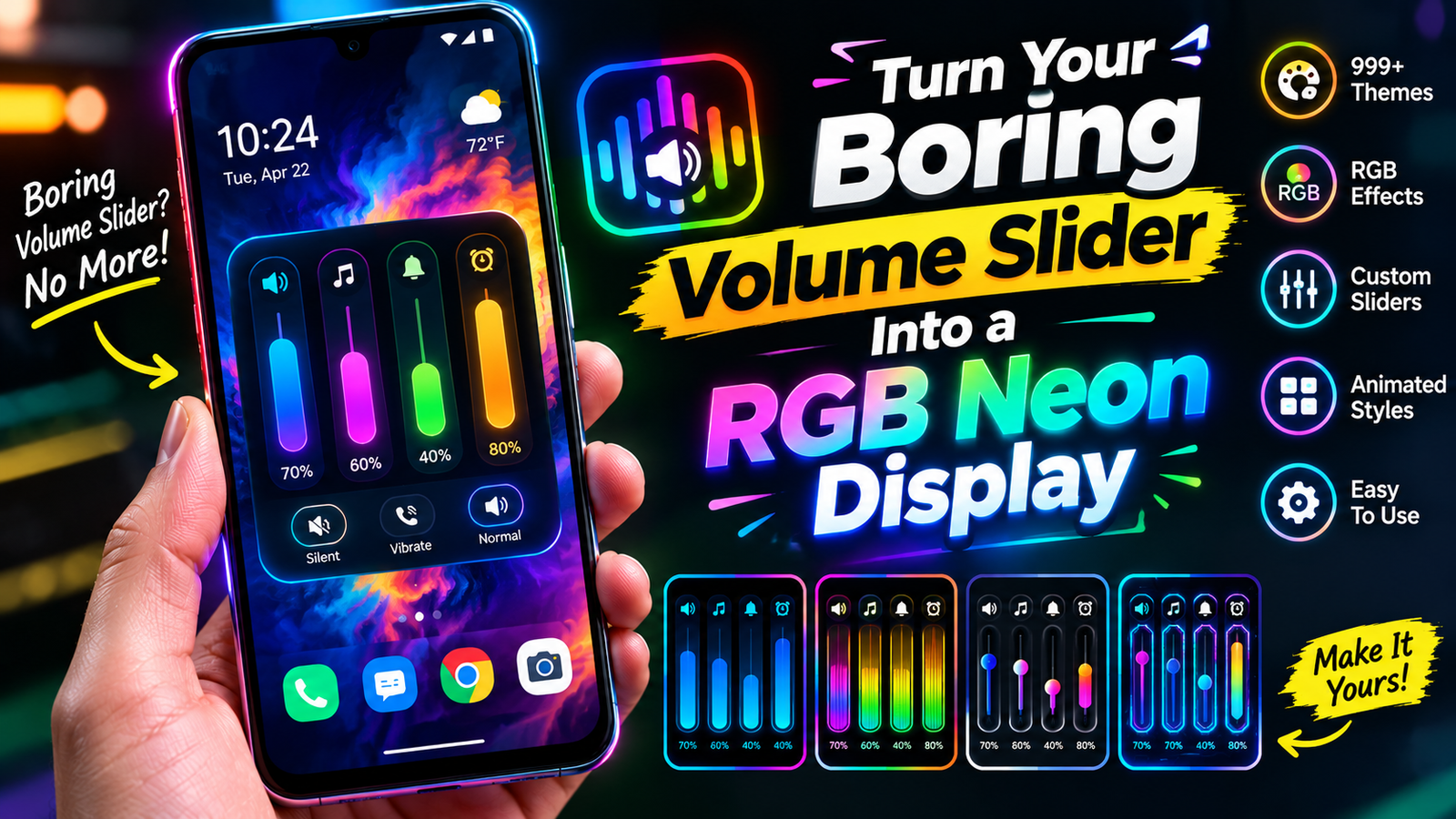
Instead of seeing a basic slider, you can choose a design with glowing colors, neon borders, animated effects, and different slider shapes.
Suddenly, something you interact with every day becomes another customizable part of your Android experience.
RGB Effects Bring the Volume Panel to Life
The biggest attraction for many users will probably be the RGB customization.
RGB lighting has become extremely popular in gaming PCs, keyboards, mice, desks, and other technology accessories. The same visual concept can now be applied to your Android volume panel.
The app provides dynamic RGB effects that can be customized by adjusting elements such as color ranges and transition speeds. This means the colors don’t necessarily have to remain static. They can move and transition across the volume interface to create a more energetic appearance.
Imagine pressing the volume button and seeing a smooth spectrum of colors appear around your slider.
Instead of a basic system notification, you get a small visual animation.
For users who enjoy neon and gaming-inspired aesthetics, this can make the phone feel much more personalized.
More Than 999 Themes
One of the strongest features of the app is the size of its theme collection.
The current Google Play description advertises 999+ exclusive themes covering categories such as Neon, LED, RGB, Simple, and Dark.
That’s important because not everyone wants an extremely bright neon interface.
You might want a colorful RGB design during gaming sessions, but prefer something darker and more subtle when you’re using your phone at night.
Having multiple categories gives you the ability to change the appearance without having to completely redesign your phone.
You can experiment with different styles and find the one that fits your device.
And because the volume panel is such a small part of the overall interface, even a simple theme change can make it feel noticeably different.
Customize the Slider Itself
The customization doesn’t stop with colors.
The app also allows users to modify different aspects of the slider, including its thickness and length, as well as elements such as borders, background transparency, and rounded corners.
This is where the app becomes more interesting than a simple collection of volume wallpapers.
You can build a volume panel around your own preferences.
Maybe you want a thin, elegant slider.
Maybe you prefer a large, glowing bar that’s easy to see.
Or perhaps you want rounded corners and a partially transparent background.
These small details can change the entire appearance of the interface.
Control More Than Media Volume
Another useful feature is that the custom panel isn’t limited to one volume control.
The app’s feature description includes controls for media, brightness, ring volume, notifications, alarms, Bluetooth, and voice calls.
That can make the panel more useful than simply changing the appearance of your media-volume slider.
Instead of treating the app as a visual theme only, you can think of it as an alternative control center for several sound-related settings.
The exact controls available can depend on the Android version and device, but the concept is straightforward: put more controls into a visually customized panel.
One-Tap Theme Changes
Customization is only useful when it is easy to use.
If changing a theme required rebuilding the entire interface every time, most people wouldn’t bother.
Neon LED Volume includes a one-tap apply feature, allowing users to switch styles quickly.
This is especially useful if you like experimenting.
You can try one RGB design, see how it looks, and then immediately switch to another.
There is no need to commit permanently to a single appearance.
That makes the app more approachable for people who enjoy changing their phone’s look regularly.
Animated Volume Controls
Static colors are one thing.
Animation takes the experience a step further.
The app supports real-time visual effects, including moving light effects, slider animations, and blinking LED-style visuals.
This creates a more dynamic feeling whenever the volume panel appears.
For someone who enjoys gaming-style RGB lighting, these effects can make the phone feel more futuristic.
But there is an important balance here.
Animations can look impressive, but too many effects can also become distracting.
The best setup is usually the one that looks good without making a simple task feel complicated.
Smart Icons Add Another Layer of Customization
A volume panel isn’t only about sliders.
It also needs icons that tell you what each control does.
The app provides different sound-icon options, including designs inspired by different smartphone operating systems.
That means you can change more than just the color of the panel.
The icons can also become part of the overall theme.
For example, a futuristic neon panel might look better with modern glowing icons, while a simple dark theme may work better with minimalist symbols.
These details may seem small, but together they can make the interface feel much more cohesive.
Keep It Away From Certain Apps
One feature that could be particularly useful for gamers and people who watch a lot of videos is the app blacklist.
The feature allows users to prevent the customized volume panel from appearing inside selected applications.
Why would that matter?
Imagine you’re playing a game and accidentally trigger the volume panel while trying to interact with something on the screen.
Or you’re watching a full-screen video and don’t want a large customized panel covering part of the display.
With an app blacklist, you can choose where the custom volume interface should remain active and where it should stay out of the way.
That’s a good example of customization being about functionality—not just appearance.
A Great Match for Gaming Phones
RGB lighting is strongly associated with gaming.
Gaming keyboards, desktop PCs, monitors, mice, and even gaming phones often use colorful lighting effects.
Neon LED Volume fits naturally into that ecosystem.
If your phone already has a gaming-style wallpaper, RGB keyboard, colorful icons, or a neon-themed interface, adding an RGB volume panel can make the overall design feel more consistent.
Instead of having one boring system component interrupting the theme, the volume panel becomes part of the visual experience.
Of course, you don’t need to be a gamer to enjoy it.
Anyone who likes colorful customization can use the same features.
Is It Only About Looks?
Not necessarily.
The biggest reason to install a customization app like this is probably visual, but there are practical benefits too.
A customized slider can be easier to recognize quickly.
Larger controls may be easier to interact with.
Different colors and icons can help separate different controls.
And having several sound-related controls in one panel can potentially make common adjustments faster.
The important point is that the app doesn’t try to replace the entire Android experience.
It focuses on one specific interface element and gives you more control over it.
What About Compatibility?
Neon LED Volume is designed for Android devices, and third-party app listings indicate support beginning with Android 7.0 for recent versions.
However, Android manufacturers customize their operating systems differently.
Samsung, Xiaomi, OnePlus, Google Pixel, Motorola, and other brands can handle system interfaces and permissions in different ways.
That means the experience may not be identical on every phone.
Before relying on the app for every volume-control situation, it’s worth testing it on your own device.
You should also review the permissions it requests.
The developer’s description says the app uses Android’s Accessibility Service to detect volume-key presses and display the customized panel, and states that it does not collect or share personal data.
As always, users should review the permissions presented on their own device before enabling system-level access.
Does It Make Android Better?
That depends on what you want from your phone.
If you prefer a completely stock Android experience and don’t care about customization, the default volume slider may be perfectly fine.
But if you enjoy personalization, Neon LED Volume gives you another part of Android to experiment with.
You can turn an overlooked system element into something that matches your personality.
And that’s really the appeal.
You’re not buying a new phone.
You’re not changing the display.
You’re not installing a completely different operating system.
You’re simply changing the way one small but frequently used part of your phone looks and behaves.
Final Verdict
Neon LED Volume – Volume Style is designed for Android users who want more personality from their volume controls.
Its biggest attraction is the combination of 999+ themes, RGB effects, animated styles, customizable sliders, smart icons, and controls for multiple sound-related functions.
Every time you press a volume button, instead of seeing the same standard slider you’ve seen hundreds of times, you can get a customized visual experience that matches your style.
So if you’re ready to move beyond the standard Android volume slider, Neon LED Volume could be the small upgrade that gives your phone a completely new visual personality.