Do you remember the days when using a Nokia phone felt completely different from using a modern smartphone? The physical keypad, simple menus, classic icons, familiar sounds, and that unmistakable old-school home screen created an experience that was incredibly simple.
Today, smartphones are faster and more powerful than ever, but sometimes that simplicity is exactly what people miss.
That is where a Nokia-style launcher comes in.
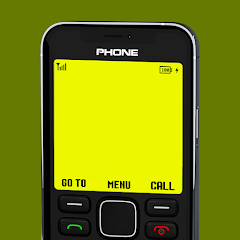
A Nokia Launcher can transform the appearance and interaction style of a modern Android phone into something inspired by classic Nokia devices. Instead of replacing Android itself, the launcher changes the home-screen experience and adds retro-style elements such as a classic keypad, old-fashioned menus, familiar navigation, and nostalgic visuals.
One current Google Play example, Nokia Phone Launcher, has more than 1 million downloads and is specifically designed to recreate the classic Nokia interface on modern smartphones.
What Is Nokia Launcher?
Nokia Launcher is essentially a customization tool that gives your Android smartphone a classic-phone appearance.
Your Android operating system is still running underneath, so you don’t actually turn your modern smartphone into an original Nokia handset. Instead, the launcher creates a visual and interactive experience inspired by older Nokia phones.
This can include a classic-looking home screen, keypad-style controls, retro menus, wallpapers, icons, and other nostalgic elements.
For people who grew up using Nokia phones, the biggest attraction isn’t necessarily advanced customization. It’s the feeling of going back to a much simpler phone experience.
And that is exactly what makes this type of launcher interesting.
Bring Back the Classic Nokia Home Screen
The home screen is probably the first thing you’ll notice after activating a Nokia-style launcher.
Instead of the typical Android layout filled with colorful application icons and widgets, the screen can resemble an older Nokia interface.
The design is intentionally simple.
You may see elements inspired by the classic display, familiar navigation controls, signal indicators, battery information, and a traditional menu structure.
This creates a completely different feeling from a modern Android launcher.
Rather than trying to make your phone look futuristic, Nokia Launcher goes in the opposite direction.
It makes a powerful modern smartphone look like something from the early mobile-phone era.
The Classic Keypad Experience
One of the most recognizable parts of old Nokia phones was the physical keypad.
Modern smartphones obviously don’t have those physical buttons, but Nokia-style launcher apps can recreate the appearance and functionality of a classic keypad on the touchscreen.
For example, Nokia Phone Launcher includes a Nokia-style keypad for direct dialing and saving numbers in a classic-phone style.
This makes interacting with the phone feel completely different.
Instead of tapping a modern circular dialer interface, you can get that familiar old-phone appearance.
For nostalgia fans, this is one of the most enjoyable parts of the experience.
Classic Navigation and Hot Keys
Another interesting feature found in Nokia-style launchers is shortcut navigation.
The Nokia Phone Launcher listing describes hot-key navigation where different directions can provide quick access to features such as the internet, camera, switching back to the default launcher, and the classic Snake game.
This is a clever way to recreate the feeling of navigating an old feature phone.
Everything feels more deliberate.
You aren’t surrounded by dozens of widgets, folders, and floating icons. Instead, the interface focuses on simple menus and quick shortcuts.
That simplicity can actually feel refreshing on a modern smartphone.
Play Classic Snake
And of course, what would a retro Nokia experience be without Snake?
Some Nokia-style launcher apps include a classic Snake-inspired game.
For example, Nokia Phone Launcher includes Classic Snake Game 97, while other Nokia-inspired launchers also advertise retro Snake experiences with dot-matrix-style visuals and classic sounds.
It’s obviously not going to replace modern mobile games, but that’s not really the point.
The attraction is nostalgia.
Seeing that little snake moving around a simple screen can instantly remind you of an era when mobile gaming didn’t require huge downloads, powerful graphics processors, or massive storage.
A Retro Web Browser
Some versions go beyond simply changing the home screen.
Nokia Phone Launcher also includes a web browser designed to fit the Nokia-inspired interface.
The idea is interesting because it attempts to maintain the same visual experience even when you’re performing modern smartphone tasks.
You still have access to modern Android capabilities, but the interface surrounding them can feel much more old-school.
Of course, browsing the modern web through a retro interface doesn’t magically make the internet work like it did twenty years ago. It’s mainly a visual and nostalgic experience.
Customize the Nokia Experience
Another advantage is that you’re not necessarily locked into one exact appearance.
Depending on the launcher you’re using, customization options can include wallpapers, phone names, colors, themes, and different classic phone models.
For example, the iPhone version of Nokia Launcher lists Nokia-inspired models including the Nokia 1280, Nokia 1100i, and Nokia 5300, along with options for changing wallpaper, device name, and appearance color.
Android versions can offer their own combinations of classic themes and customization settings.
This means you can choose whether you want something closer to a basic monochrome feature phone or a more colorful classic Nokia-inspired design.
Why Would Anyone Use a Nokia Launcher Today?
At first, using a retro launcher on a modern smartphone might seem unnecessary.
After all, today’s Android launchers are far more advanced.
But that’s actually the reason some people enjoy this concept.
Modern phones can be overwhelming.
You have social media notifications, widgets, recommendations, advertisements, news feeds, games, and dozens of applications competing for your attention.
A simpler launcher can make your phone feel less complicated.
The classic Nokia-inspired interface naturally limits the amount of visual information presented on screen.
That can make your device feel more focused.
For someone who wants to reduce the temptation to constantly open applications, a retro launcher can also be an interesting experiment.
It Doesn’t Turn Your Smartphone Into a Real Nokia
There is an important distinction to understand.
A Nokia Launcher doesn’t physically transform your Android phone into a classic Nokia handset.
Your touchscreen, processor, Android operating system, cameras, modern applications, and other hardware remain the same.
The launcher is primarily changing the interface and experience.
So you should think of it as a Nokia-inspired Android experience, rather than an actual Nokia operating system.
Some apps also clearly state that they are fan-made projects and are not officially affiliated with Nokia Corporation.
That’s important when choosing and describing these apps.
Is It Worth Trying?
If you have no interest in retro phones, Nokia Launcher probably won’t provide much value.
But if you remember classic Nokia devices and want to recreate that experience on your current Android phone, it can be surprisingly fun.
The biggest advantage is that you don’t have to give up your modern smartphone completely.
You can still have Android apps and modern hardware while changing the interface to something much simpler and more nostalgic.
And if you decide you don’t like the experience, you can return to your original launcher.
Some Nokia-style launchers even provide a shortcut for switching back to the default launcher.
Things to Keep in Mind
There are a few things worth considering before making a retro launcher your permanent home screen.
First, the exact features depend heavily on which Nokia-style launcher you install.
Not every app has the same keypad, themes, games, browser, or customization options.
Second, some versions contain advertisements. The current Google Play listing for Nokia Phone Launcher shows that the app contains ads.
User reviews for some Nokia-style launchers have also mentioned intrusive advertising and limitations with certain shortcuts, so it’s worth checking the current Play Store listing and reviews before deciding which version to use.
Download
Finally, remember that these are generally fan-made or Nokia-inspired experiences rather than official Nokia software.
Final Thoughts
Nokia Launcher – Turn Your Android Into a Classic Nokia Phone is really about bringing back an experience that modern smartphones have largely left behind.
The classic keypad, simple menus, retro home screen, old-style navigation, nostalgic sounds, and even Snake can make your modern Android phone feel surprisingly different.
It’s not about making your smartphone more powerful.
It’s about making it simpler.
For anyone who remembers the classic Nokia era, a Nokia-style launcher offers an easy way to experience that nostalgia without giving up the capabilities of a modern Android device.
Your phone may have a powerful processor, multiple cameras, a high-refresh-rate display, and access to millions of apps—but with the right launcher, you can still make it feel like the simple phone you remember from years ago.